
The situation: ODTFINCC is on its way out
Anyone replicating cost centres from an SAP ERP system into SuccessFactors Employee Central knows the classic setup: an IDoc of type ODTF_CCTR01 leaves the ERP, passes through a CPI iflow, and lands in Employee Central, keeping the cost centre hierarchy up to date. This integration has been running reliably for years, which is exactly what makes the situation so tricky.
SAP has made clear in Note 3255864 that the software component ODTFINCC will be deprecated with the S/4HANA 2025 release. Anyone still using the component should act at the latest with the next release upgrade, or proactively before that.
SAP's officially recommended migration path is the Master Data Integration Service (MDI) on BTP, which according to SAP documentation is intended to take over cost centre replication going forward. For many customers, however, this involves far more effort than necessary.
Why MDI is often overkill for smaller landscapes
MDI is a powerful, centralised master data service on BTP. It makes sense when you need to distribute many master data objects from multiple source systems into various cloud applications and require central governance. For the scenario "cost centres from one ERP system to SuccessFactors", the calculation usually looks different:
- MDI must be set up, configured and operated as a new BTP service, which takes time and requires knowledge that teams often have to build up first.
- Another service means another monitoring endpoint. In day-to-day operations, someone needs to know where to look when replication stalls.
- MDI requires a licence. For a single integration object, that is hard to justify to the customer.
- CPI is already present in most modern SAP landscapes, so the infrastructure for an alternative is already there.
I'm not saying this to dismiss MDI. But I think it is important to run an honest business case before switching platforms.
The idea: keep using the proven SAP integration package
In the CPI content catalogue, SAP provides the package "SAP ERP or SAP S/4HANA Integration with SAP SuccessFactors Employee Central: Cost Center". It has been running in production for years, is well documented and is already familiar in most customer environments. The idea is simple: don't throw this package away, adapt it instead.
Rather than the deprecated IDoc type ODTF_CCTR01 (from ODTFINCC), you use the standard IDoc COSMAS01, which is delivered out of the box by SAP ERP and S/4HANA and transports cost centres via classic ALE distribution. In the CPI package, only the mapping is swapped: COSMAS comes in, the SFSF EC API call stays. The rest of the iflow, including routing, error handling and logging, remains unchanged.
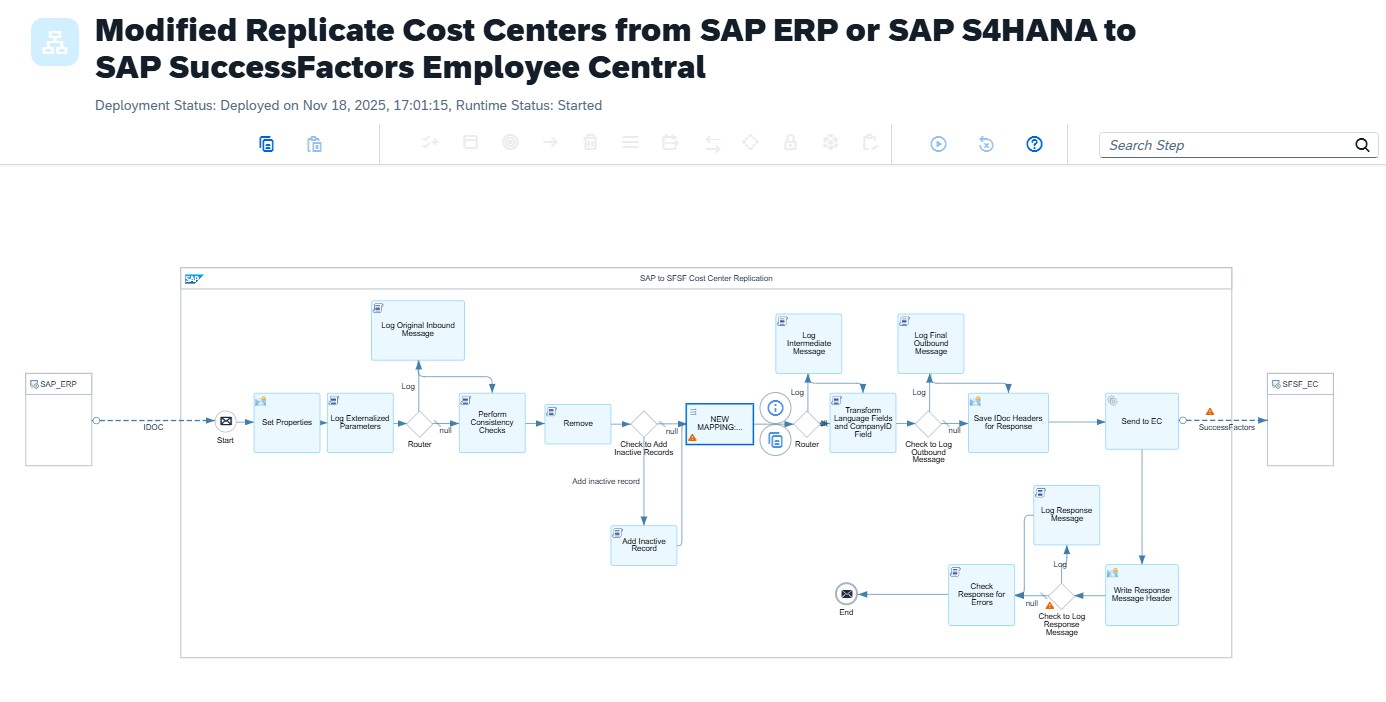
The advantage: you stay on familiar ground. No new service, no new concept, no new monitoring tool. Anyone who knows ALE and CPI can complete this migration in a matter of days.
How to do it
1. Copy the SAP integration package
In the Discover section of the CPI tenant, find the cost centre package via search. Rather than using it directly, copy it into your own workspace. This keeps the SAP standard as a reference and lets you adapt the copy freely. This is standard practice and protects against unwanted updates overwriting the original.
2. Adapt the mapping
In the copied iflow, replace the source mapping: instead of ODTF_CCTR01, the iflow now expects a COSMAS01 IDoc as input. The relevant fields (cost centre number, description, validity period, company code, controlling area, parent cost centre, responsible person) are all present in COSMAS and can be mapped directly to the SuccessFactors EC cost object.
What I pay attention to in the mapping: language-dependent texts (short and long text) need separate handling when EC is run in multiple languages. You also need to keep effective dating in mind: EC works with time-dependent records, and the cost centre start date must be transferred correctly to avoid losing historical data.
3. Set up ALE distribution in ERP
On the ERP side, enable distribution via the classic ALE mechanisms: add the message type COSMAS to the distribution model and create the partner agreement with the CPI endpoint as the target port. For ongoing synchronisation I recommend change pointer-based distribution, which sends only changed cost centres rather than the entire stock on each run.
This is nothing new: anyone who already distributes master data via ALE knows this mechanism. The only difference is that the receiver is now a CPI iflow rather than another SAP system.
4. Test and go live
I recommend starting with a single test cost centre: make a change in ERP, trigger the IDoc manually, follow it through the CPI monitor, check the result in SuccessFactors. Once the mapping is correct and the iflow runs without errors, you can enable change pointer-based distribution and extend it to the full cost centre hierarchy.
Effort and economics
Realistically, the implementation effort (copy package, build mapping, configure ALE, test) amounts to a few person-days. In projects where CPI is already in use and ALE distribution is familiar, it can be even shorter.
No additional licence costs arise. Monitoring runs through the same CPI channel as all other iflows. And because this is a proven SAP package, the risk of teething problems is low.
When MDI is still the right choice
To be fair: there are scenarios where MDI is clearly the better solution. When multiple source systems deliver cost centres, when objects beyond cost centres (employees, profit centres, business partners) need to be synchronised centrally, or when a company is already moving towards a BTP-centric master data strategy, MDI is the right path. The trade-off is worth evaluating. But for a single object from a single source system, MDI is rarely justified in my view.
Conclusion
The deprecation of ODTFINCC is not an emergency, but it needs a deliberate response. Treating MDI as the only option just because SAP recommends it may be wasting time and budget. Continuing to use the existing CPI integration package with an adapted COSMAS mapping is technically sound, economically sensible and the more pragmatic choice in most projects.
I have implemented this solution in a customer project. If you have questions about the concrete implementation or are facing a similar scenario, feel free to get in touch.