
What is EMIS and how does it differ from the previous Event Mesh?
EMIS stands for Event Mesh in SAP Integration Suite. The messaging capability that previously only existed as a standalone BTP service has been integrated directly into the Integration Suite. For day-to-day projects this has three key consequences:
- Customers already running the Integration Suite on Standard or Premium edition can activate EMIS as a capability without an additional subscription.
- The previous Event Mesh (Standalone) is not deprecated, but is now the second choice for new projects.
- Advanced Event Mesh (AEM), built on Solace technology, remains the offering for very high throughput and mature event architectures. In SAP's positioning, EMIS is the capability embedded in the Integration Suite for typical integration loads; AEM is separately licensed for higher throughput and more mature EDA scenarios.
The following table shows the key differences at a glance. For the currently valid functional scope and limits of EMIS (maximum message size, spool capacity, supported protocols per release), SAP Note 3461547 is the canonical reference.
| Event Mesh Standalone | EMIS | Advanced Event Mesh | |
|---|---|---|---|
| BTP service | Separate subscription | Part of IS entitlements | Separate subscription (optional) |
| Protocols (consumer) | AMQP, REST, MQTT | AMQP, REST/Webhook, MQTT | AMQP, MQTT, REST, WebSocket |
| Max. message size | 1 MB | 1 MB (total spool 2 GB) | Configurable |
| Target audience | Existing projects | IS customers, new projects | High throughput, mature EDA |
| Upgrade path to AEM | Possible but complex | Migration path available | - |
EMIS launched in June 2024 with AMQP only; REST/Webhook and MQTT were added in the Q3 2024 release. Check SAP Note 3461547 for currently valid limits and protocol availability.
Why event-driven? Typical S/4HANA use cases
Classic S/4 integrations run synchronously: system A calls, system B responds immediately. This works well for interactive scenarios but quickly hits limits with bulk processing and distributed landscapes:
- Bulk processing without bottleneck: Hundreds of document postings, stock changes, or business partner creations per minute would generate a constant stream of API calls in the synchronous model. A message broker buffers the load and decouples producer from consumer.
- Loose coupling: If the target system is briefly unavailable, the message stays in the queue. The consumer processes it when it recovers, without the producer noticing or needing any error handling.
- Fan-out to multiple consumers: If an S/4 event should flow simultaneously into a CPI iflow, a BI tool, and a mobile app, EMIS handles the fan-out via multiple queue subscriptions.
- Real-time situational awareness: Downstream systems react to changes in the core system as they happen, rather than waiting for batch jobs or polling cycles.
S/4HANA provides a growing number of standard events; SAP maintains the authoritative, release-specific catalog in the SAP Business Accelerator Hub. The most common starting points for EMIS projects are:
sap.s4.beh.businesspartner.v1.BusinessPartner.Changed.v1- Business partner creation and changesap.s4.beh.materialdocument.v1.MaterialDocument.Posted.v1- Goods receipt, goods issue, transfer postingsap.s4.beh.salesorder.v1.SalesOrder.Created.v1- New sales order creationsap.s4.beh.purchaseorder.v1.PurchaseOrder.Changed.v1- Purchase order changes- Custom events via ABAP development (RAP objects, Business Add-Ins)
Topic names follow the CloudEvents naming scheme. SAP maintains the release-specific catalog of available events in the SAP Business Accelerator Hub; on the system side, available topics can be browsed via the search help in transaction /IWXBE/INBOUND_CFG or /IWXBE/OUTBOUND_CFG.
Architecture overview: from S/4 PCE to the consumer
The message flow breaks down into three logical layers:
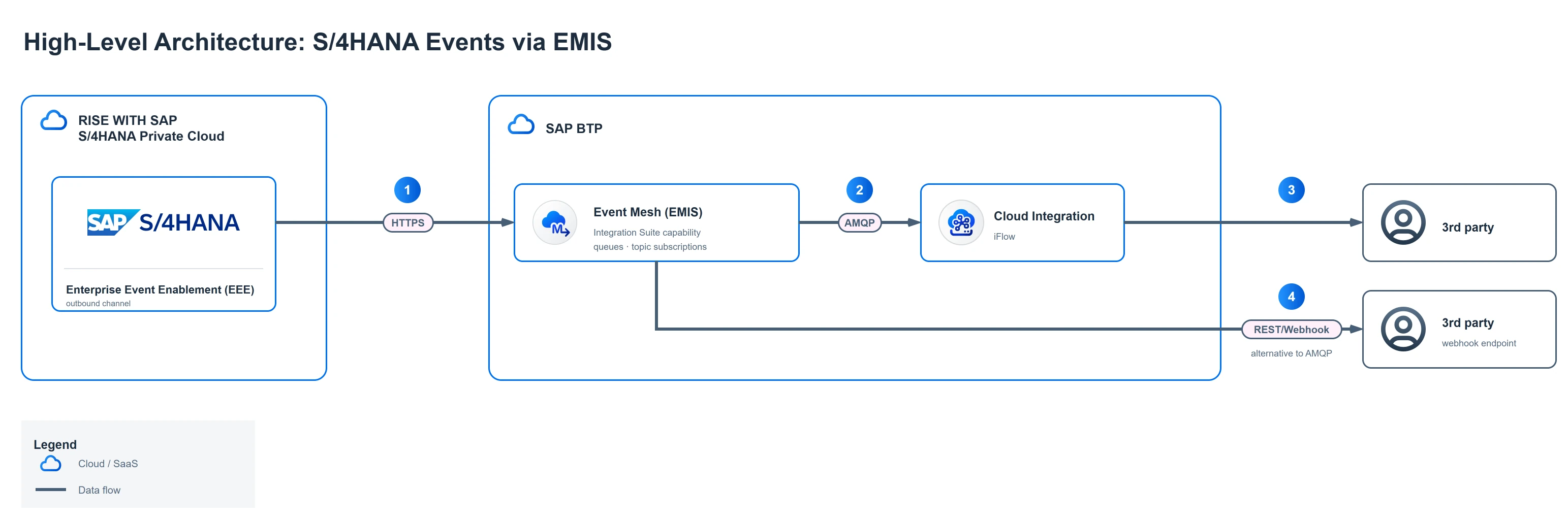
The numbered steps in the diagram:
- The EEE framework sends events via HTTPS to EMIS on BTP.
- The iFlow in Cloud Integration subscribes to the queue via AMQP; EMIS pushes incoming events immediately.
- The iFlow processes the event and hands it over to the target system.
- Alternatively, EMIS pushes events via REST/webhook directly to an HTTPS endpoint, without the durability guarantee of a queue.
Layer 1: S/4HANA Private Cloud (Producer)
Business logic generates a domain event. The Enterprise Event Enablement Framework (EEE) picks up the event and passes it to the ABAP Daemon (daemon session) - an ABAP background process that maintains the connection to EMIS and reliably delivers messages. The daemon is created automatically when the channel is activated in /IWXBE/CONFIG; the only customer-side preparation is a daemon user with role SAP_IWXBE_RT_XBE_DAEMON. Monitoring is available via SMDAEMON.
In S/4HANA Private Cloud (RISE/PCE), one additional prerequisite requires a service request to SAP:
- Open the outbound path to BTP: PCE systems route outbound traffic through an SAP-managed proxy. For HTTPS connections to the EMIS endpoints (token endpoint and AMQP WebSocket, both port 443), SAP must explicitly allow the target hostnames in the proxy. Without this, channel activation in transaction
/IWXBE/CONFIGfails with a connection error regardless of how correctly SM59 and the OAuth client are configured.
This step and how to formulate the service request are the central topic of Part 3.
Layer 2: EMIS on BTP (Broker)
EMIS receives the event and stores it in a queue. Queues are persistent: the message is retained until a consumer processes it and confirms with an explicit acknowledgement. Via topic subscriptions, multiple queues can be linked to the same message type - one event then automatically lands in several queues, enabling fan-out to different consumers. The EMIS UI provides basic monitoring: active messages, consumer status, error overview.
Layer 3: Consumer
- SAP Cloud Integration (CPI) with AMQP Sender adapter: the adapter holds a persistent connection to EMIS and subscribes to the queue. EMIS pushes incoming messages on that connection, the iflow starts immediately, and the acknowledgement is sent after the iflow completes successfully.
- REST/Webhook: EMIS actively delivers the event to a configured HTTPS endpoint. Simple to set up, but without the durability guarantee of a queue.
- Third-party systems: Any application with AMQP or REST support can consume events directly.
Choosing the right protocol: AMQP, Webhook or MQTT?
On the producer side (S/4 to EMIS) there is no protocol decision: the EEE Framework always sends via HTTPS to the AMQP endpoint of EMIS. The protocol choice lies on the consumer side.
AMQP (recommended for CPI and enterprise consumers)
The Advanced Message Queuing Protocol is the most robust option. The CPI adapter opens a persistent AMQP connection and subscribes to the queue; EMIS pushes incoming messages immediately. The iflow starts, processes the message, and only then sends the acknowledgement. Only at that point is the message deleted from the queue. Even if CPI is temporarily unavailable or an iflow fails, the message is retained and redelivered on the next attempt. Configuring the AMQP Sender adapter requires three values from the EMIS service key: the AMQP hostname (field messaging[amqp10ws].uri), port 443, and the path /protocols/amqp10ws. The OAuth 2.0 client profile in transaction OA2C_CONFIG is IWXBE/MGW_MQTT, even for AMQP-based communication.
REST/Webhook
EMIS pushes events actively to a configured HTTPS endpoint. This is the simplest option for serverless consumers, external SaaS systems, or quick prototypes. The downside: durability rests with EMIS itself; if the target endpoint is consistently unreachable and the configured retry limit is exceeded, dead-letter behaviour kicks in (details per SAP Note 3461547). For critical integrations, AMQP is preferable.
MQTT
A lightweight publish-subscribe protocol originally designed for resource-constrained IoT devices. Rarely the first choice in classic S/4 integration scenarios - relevant when MES systems, edge devices, or machines need to consume events directly.
| AMQP | REST/Webhook | MQTT | |
|---|---|---|---|
| Typical consumer | CPI, enterprise backends | External REST APIs, SaaS | IoT, edge devices |
| Message durability | Yes (queue with acknowledgement) | No (retry limit) | No (QoS 0) |
| Retry on consumer failure | Automatic (message stays in queue) | EMIS-side (configurable) | - |
| Configuration effort | Medium | Low | Low |
Prerequisites and licensing
On the BTP side:
- SAP Integration Suite with Standard or Premium edition. EMIS is included in these editions but must be activated as a capability.
- Subaccount entitlement for the
defaultservice plan (broker initialisation) andmessage-client(producer/consumer binding) of the Event Mesh instance. Verify in BTP Cockpit under "Entitlements". Service bindings can be issued as standard secret (binding-secret) or X.509 certificate-based (mTLS). - BTP Trial: EMIS requires an enterprise account with Standard or Premium edition of the Integration Suite and is not available in trial subaccounts (SAP Help: Prerequisites).
On the S/4HANA PCE side:
- S/4HANA release 2022 or later recommended; newer releases ship more standard events and more stable EEE Framework versions. For the exact minimum release for specific event types, check SAP Note 3461547.
- Administrative user with role
SAP_IWXBE_RT_XBE_ADMfor channel configuration in/IWXBE/CONFIG. - Daemon user with role
SAP_IWXBE_RT_XBE_DAEMONprepared; outbound path requested via SAP service request (details in Part 3).
What comes next?
With the fundamentals covered, the next parts get concrete:
- Part 2 shows how to set up EMIS on BTP: activating the capability, creating a message client, configuring a queue and topic subscription, and generating a service key.
- Part 3 covers everything that needs to be prepared on S/4HANA PCE before configuration begins: certificate import via STRUST, daemon user, and the service request for the outbound network release.
- Part 4 connects both sides: SM59 destination, OAuth client configuration (
OA2C_CONFIG), channel creation in transaction/IWXBE/CONFIG, outbound binding, and the first event landing in the EMIS queue.
If you already know a similar implementation using the standalone Event Mesh: the technical path on the S/4 side is identical. The only change is on the BTP side - EMIS instead of a separate Event Mesh subscription, everything in one IS interface.
Further reading
- SAP Note 3461547 - canonical reference for EMIS restrictions, limits and region availability (accessible via SAP for Me)
- SAP Blog: Meet your new friend EMIS - Introduction, positioning and roadmap (Strothmann, June 2024)
- SAP Blog: S/4HANA Direct Connectivity with Event Mesh in Integration Suite - concrete configuration path with SM59 and OA2C_CONFIG (Rakheja, July 2024)
- SAP Blog: S/4HANA On-Premise Integration with Event Mesh - STRUST, SPRO and channel configuration (Kumar, March 2023)
- SAP Help: Enterprise Event Enablement for S/4HANA - official documentation on outbound and inbound
- SAP Help: Event Mesh capability in the Integration Suite
- SAP Help: Configure A Message Client - service plans, bindings and X.509 certificates
- SAP Blog series: SAP Event Mesh Deep Dive - EDA concepts, single-/multi-tenancy, CAP integration (Kumar/Khullar, 2022)
- SAP Help: AMQP Sender for SAP Event Mesh - adapter configuration in CPI (hostname, port, OAuth)
- SAP Business Accelerator Hub: S/4HANA Business Events - release-specific event catalog with CloudEvents topic names