
The Copilot Button Is Gone
Version 2605 quietly and temporarily removed Copilot from Outlook Classic for everyone without a dedicated license. I used the button regularly for non-critical mails: select the draft, sharpen it, send. Would I have done the same with ChatGPT or browser-based Copilot? For internal mails, maybe. But client mails with project details do not belong in an external service.
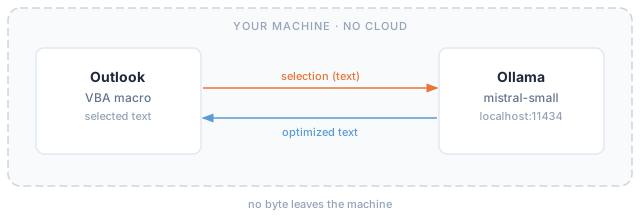
So I built the thing locally: a VBA macro in Outlook, Ollama on the machine, not a byte leaving it.
What the Macro Had to Do
The data stays on the machine. The mail text goes to http://localhost:11434 and nowhere else, meaning my local Ollama. No cloud service, no telemetry, no external request.
The tool lives inside Outlook. One button in the Quick Access Toolbar, no switching to a second program, no copy-paste into a chat window. If the friction is higher than the old button, I will not use it.
It should not just correct the draft but also sharpen it: clearer reasoning, cleaner references, but sparingly. A three-liner must not turn into a half-page essay, and the model invents no hard facts like dates, numbers, or commitments that are not already in the draft.
The result: a single VBA module and mistral-small via Ollama on localhost. Nothing more.
How It Works in Practice
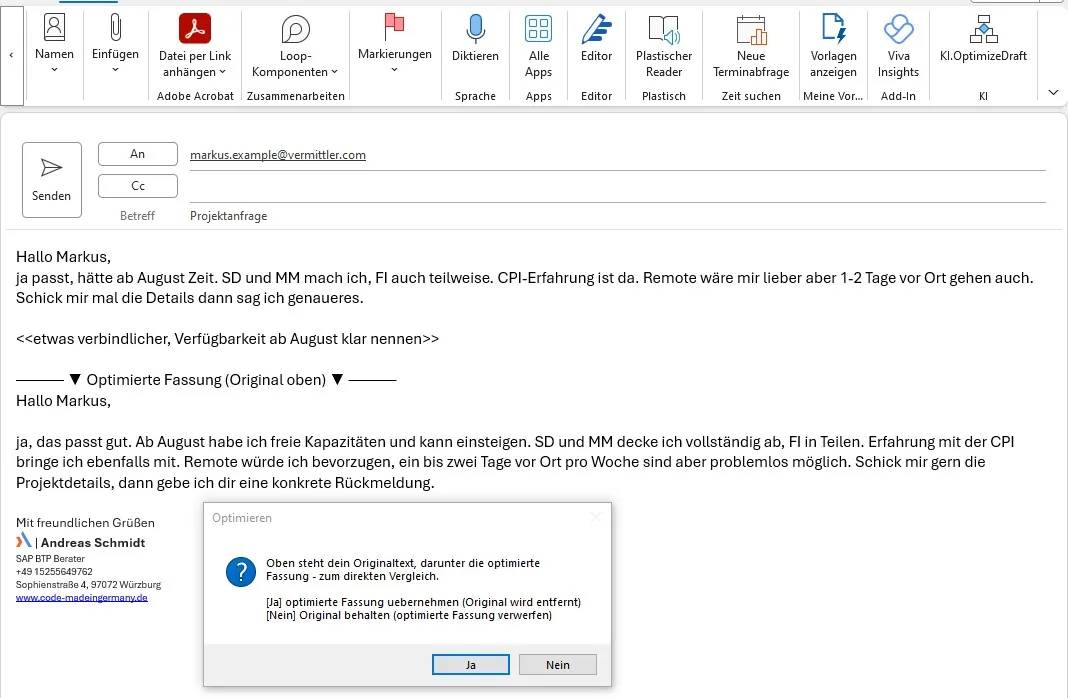
Select the body text, click the button. The macro sends the selection to Ollama, writes the response directly formatted into the mail, then asks: Yes or No. Yes keeps it, No undoes everything in a single step. I see the rendered version in the mail before I decide.
An example. A reply to a recruiter, typed out in telegram style:
Hi Markus,
yep works, could start in August. I do SD and MM, FI partly too. CPI experience is there. Remote would be my preference but 1-2 days on site work too. Send me the details and I'll say more.
<<a bit more committal, state availability from August clearly>>
That block only steers the run and is dropped from the mail. One click later:
Hi Markus,
yes, that works well. I have capacity from August and can come on board. I cover SD and MM fully, FI in parts. I also bring experience with CPI. I would prefer remote, but one or two days on site per week are no problem. Send me the project details and I will get back to you with a concrete answer.
The salutation stays intact, bullet thoughts become sentences, nothing invented is in there.
Four Pitfalls Along the Way
Touch only the selection. The first version wrote the mail text back as item.Body and instantly destroyed signature, logo, and formatting in one go. Today the macro writes exclusively into the selection through the Word editor.
Use the native Ollama API. Over /v1/chat/completions, reasoning models returned an empty content field. The native /api/chat with "think": false runs reliably.
Lock the salutation deterministically. Despite the prompt rule, the model sometimes rewrote the greeting. My favorite case: my name is Andreas, the recipient was also called Andreas. The model concluded "Andreas is me," turned the greeting into "Hi everyone," and carried the plural through. Fix: save the salutation line before calling the model and restore it character-for-character afterwards.
Outlook must not freeze. A 24B model needs a good half minute per mail. So the call runs non-blocking, the answer streams token by token, an hourglass and the status bar show progress, and Esc cancels.
Limits and Takeaway
It is not finished, and there is plenty left to improve. What the macro does not enforce deterministically, the model does not guarantee. The simple rule therefore applies: select only the body text.
For the model, mistral-small at temperature 0.4 won out: informal, fast, close to the original. That is enough for this task.
It is more than enough for daily use, though. The button is back, local and confidential, and the client mails stay where they belong.
Tools
- Ollama, local LLM runtime
mistral-small